Code Navigation & Call Hierarchy Trails
When auditing unfamiliar codebases or verifying agent patches, understanding the execution flow of a function is crucial. px0 includes a specialized Call Trail inspector that visualizes incoming and outgoing function call hierarchies level by level.
Activating Call Trails
Place your caret on any function or method identifier in the editor and press:
Alt+Shift+HThe Right Inspector panel slides open on the right side of the screen displaying the call tree.
Visual Layout of the Inspector
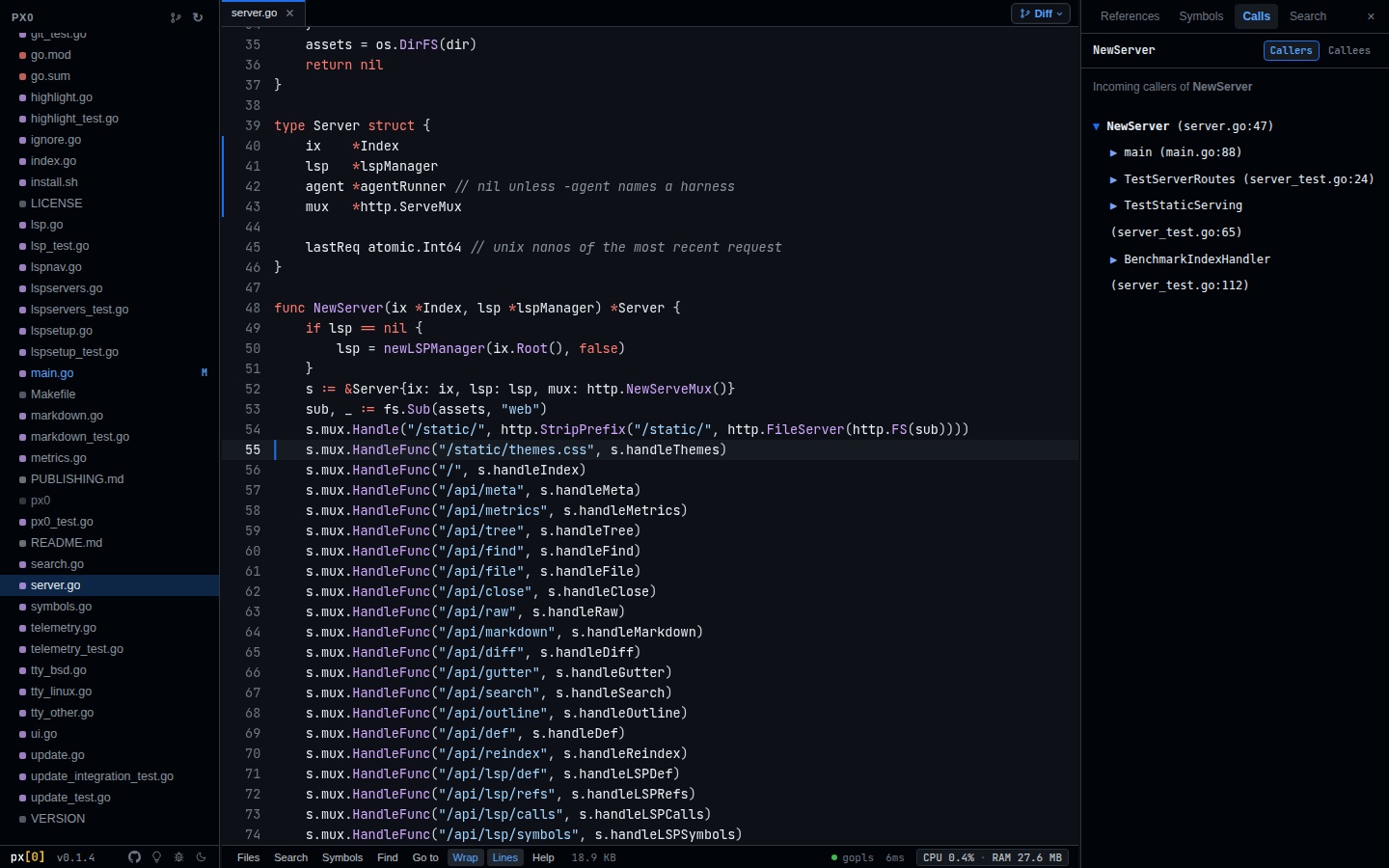
Exploring Callers vs Callees
The inspector provides two modes:
1. Incoming Callers (Who calls this?)
Select the Callers tab to inspect all functions that invoke the selected symbol.
- Click the chevron next to any caller to expand the next level of the call tree.
- Traces up to multiple nested levels without navigating away from your active code view.
- Single-click any node in the tree to jump the editor directly to the call site.
2. Outgoing Callees (What does this call?)
Select the Callees tab to see every downstream function invoked by the selected symbol.
- Quickly discover external API calls, database queries, and helper functions triggered by the function body.
Navigation History & Breadcrumbs
As you jump across definitions and call sites, px0 maintains a navigation stack:
| Shortcut | Action |
|---|---|
Alt+Left |
Jump back to previous cursor position or file |
Alt+Right |
Jump forward in history |
F12 |
Jump directly to definition |
Shift+F12 |
Inspect all reference call sites in the inspector |
Alt+U |
Find usages for active selection in the workspace |
Closing the Right Inspector panel automatically cancels in-flight reference searches and LSP queries, keeping UI response immediate and free from background CPU drag.
Symbol Outlines (Ctrl+Shift+O or Cmd+Shift+O)
To quickly see all top-level symbols in the current file without expanding call trees:
- Press
Ctrl+Shift+O(orCmd+Shift+Oon macOS). - A symbol picker displays all types, functions, constants, and variables in the active file with category badges (
fn,struct,interface,type). - Type to fuzzy-filter and press
Enterto jump directly to the declaration.
Modal Vim Navigation
Developers who prefer home-row keyboard motions can enable modal keybindings (h/j/k/l, w/b/e, gg/G, Ctrl+u/d, Visual selection) in Settings. See the Vim Keybindings Guide for complete details.